ShapeWorks Studio Groom Module
The Groom module provides options to preprocess/groom the input data. Options differ for binary segmentations and meshes. You also have the option of skipping grooming if your data is already prepped.
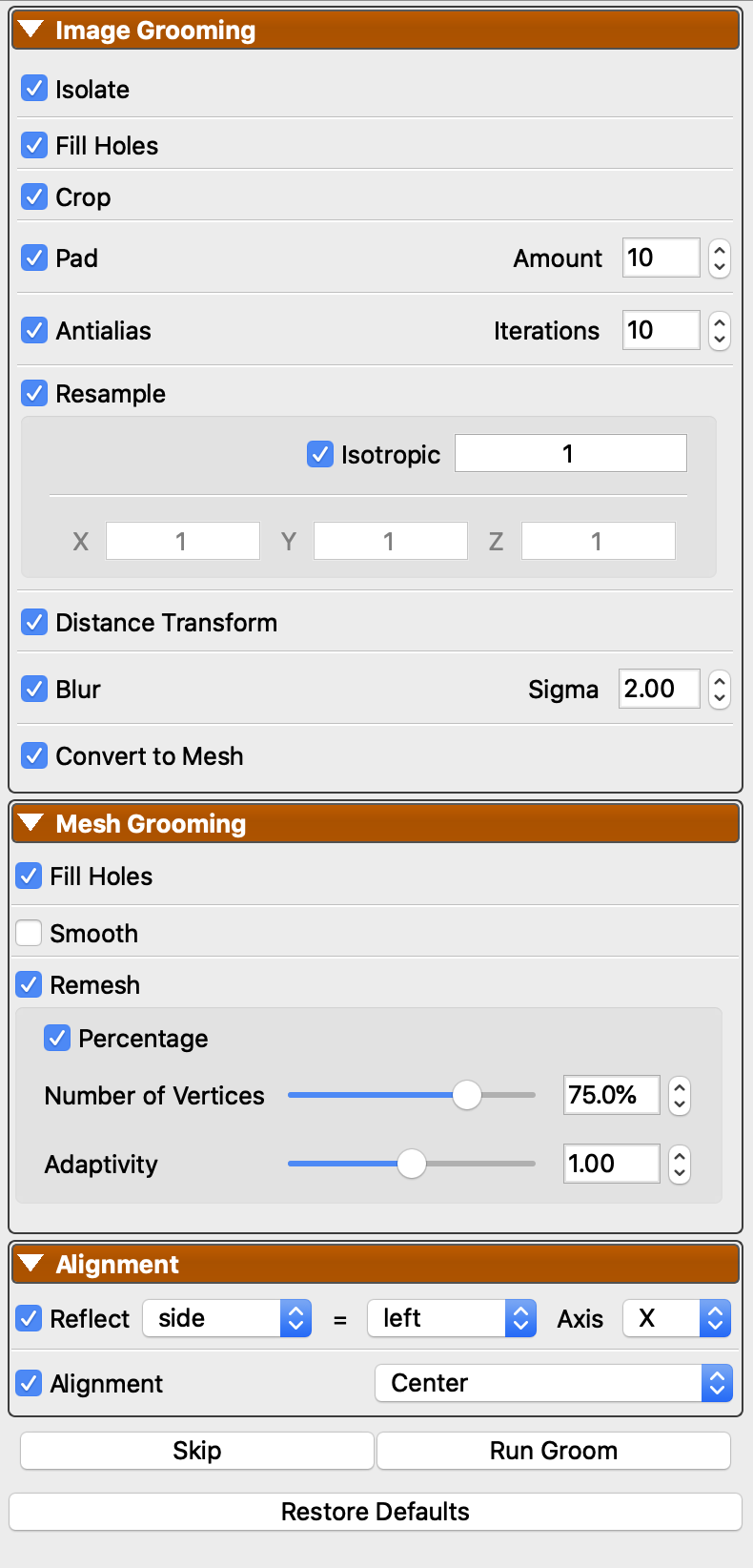
Image Grooming Parameters
| Parameter | Description |
|---|---|
| Isolate | Isolate the largest object in a segmentation. This removes extraneous noise voxels that would result in disjoint objects. |
| Fill Holes | Fill small holes in segmentation |
| Crop | Crop image down to ROI of segmentation |
| Pad | Pad image with zeroes by a given number of voxels. Typically combined with cropping |
| Antialias | Perform anti-aliasing to reduce segmentation stairstep effect |
| Resample | Resample image spacing either to isotropic (recommended) or any given spacing |
| Distance Transform | Create a distance transform for image based optimization |
| Blur | Perform smoothing on the distance transform using a gaussian blur |
| Convert to Mesh | Optionally convert to mesh at the end of Image Grooming. This enables the Mesh Grooming pipeline and will run the optimization on meshes |
Mesh Grooming Parameters
Before the mesh grooming pipeline runs, each mesh is automatically repaired. This includes triangulation, extraction of the largest connected component, removal of duplicate points and degenerate cells, non-manifold geometry fixes, and removal of zero-area triangles.
| Parameter | Description |
|---|---|
| Fill Holes | Fill small holes in the mesh |
| Smooth | Perform either Laplacian or Windowed Sinc smoothing |
| Laplacian Smoothing | Laplacian smoothing option with specified iterations and relaxation factor. In general, it is recommended to use smaller relaxation factors and more iterations rather than larger relaxation and fewer iterations |
| Windowed Sinc Smoothing | Windowed Sinc smoothing with specified iterations and passband (typically between 0 and 2). Lower passpand values produce more smoothing. |
| Remesh | Enabled remeshing using ACVD library. Scalar fields carried by the mesh are interpolated onto the new vertices |
| Remesh Percent | Specify target vertices as a percentage of existing vertices |
| Remesh Vertices | Specify target vertices directly |
| Remesh Adaptivity | Curvature adaptivity of remeshing (0 = uniform, 2.0 most adaptive). This allocates more triangles/vertices to areas of higher curvature |
Alignment Parameters
| Parameter | Description |
|---|---|
| Reflect | Option to reflect some shapes over a given axis if a given column matches a given value (e.g. reflect 'side' over 'Y' if 'left') |
| Alignment | Option to align with centering (center of mass), iterative closest point (translation and rotation), or landmarks (best fit, when specified) |
| Alignment Subset Size | Number of shapes to use when selecting the reference shape for ICP alignment. Default is auto (-1), which uses a subset of 30 to avoid expensive pairwise comparisons on large datasets. Set to 0 to use all shapes. |